
Today, I'm sharing the exact 30-day challenge that helped dozens of my students and colleagues successfully adopt AI tools that genuinely improved their productivity without creating chaos or compromising quality.
21 January 2026
Read time: 3 minutes
Supporting our sponsors directly helps me continue delivering valuable content for FREE to you each week. Your clicks make a difference! Thank you. Emmanuel
You're Missing 40% of Your Literature (And You Don't Know It)
Different fields use different words for the same concepts. Keyword search can't see past terminology barriers.
Consensus uses semantic search. It understands concepts, not just keywords.
Same research question. 4x the relevant papers.
👉 Try free using my limk here.
Most researchers approach AI tools in one of two problematic ways:
- they either try to adopt everything at once and get overwhelmed,
- or they avoid AI completely out of fear and fall behind.
However, I have discovered a gradual, systematic approach that let you integrate AI tools one week at a time without disrupting your existing work.
Today, I'm sharing the exact 30-day challenge that helped dozens of my students and colleagues successfully adopt AI tools that genuinely improved their productivity without creating chaos or compromising quality.

Last year, I watched colleagues try to revolutionise their entire research workflow overnight by adopting five different AI tools simultaneously.
Within two weeks, most had abandoned everything and returned to their old methods, frustrated and convinced that AI wasn't worth the hassle.
I took a completely different approach with one of my postdocs who was skeptical about AI but curious.
We created a four-week challenge where she adopted just one tool per week, mastering each before adding the next.
By the end of the month, she had integrated four AI tools that genuinely improved her work without overwhelming her.
This gradual approach has since helped dozens of researchers successfully integrate AI into their daily practice.
Week 1: AI-Assisted Literature Search and Organization
Start with the most time-consuming research task that has the lowest risk if AI makes mistakes.
Tool to try: Use AI-powered literature search tools like Elicit, Consensus, or Research Rabbit to help find relevant papers on a topic you're already familiar with.
Daily practice:
- Spend 20 minutes each day using the tool to search for papers on one of your research topics.
- Compare AI recommendations with your traditional search methods.
- Note which papers AI surfaces that you would have missed.
Success metric: By week's end, you should be able to conduct a comprehensive literature search 30-40% faster than your old method while still verifying all AI recommendations.
Week 2: AI-Enhanced Writing and Editing
Once you're comfortable with search tools, add AI assistance for improving your writing clarity and grammar.
Tool to try: Use Paperpal, Inkwell or Grammarly specifically for editing and improving existing text you've already written.
Daily practice:
- Take 2-3 paragraphs you've written and ask AI to suggest improvements for clarity, conciseness, or flow.
- Critically evaluate each suggestion rather than accepting blindly.
- Rewrite passages in your own voice based on useful suggestions.
Success metric: By week's end, you should notice specific patterns in your writing that AI consistently flags, helping you write better first drafts going forward.
Week 3: AI-Powered Data Analysis and Visualization
With search and writing tools mastered, add AI assistance for working with your research data.
Tool to try: Use AI coding assistants to help write or debug analysis code, or use AI-powered data visualization tools.
Daily practice: Spend 30 minutes using AI to help with one specific data task:
- writing analysis code,
- debugging errors,
- creating visualizations,
- or organizing datasets.
Always verify AI output by checking results against known data.
Success metric: By week's end, you should be able to complete routine data tasks 25-50% faster while maintaining the same accuracy through verification.
Week 4: AI-Assisted Research Planning and Organization
After mastering core research tasks, integrate AI into your planning and project management workflow.
Tool to try: Use AI tools to help outline papers, plan research projects, organize notes, or create research timelines.
Daily practice:
- Dedicate 15 minutes to using AI for planning and organization tasks.
- Ask AI to help create project outlines, identify potential research gaps, or organize existing notes and ideas.
Success metric: By week's end, you should have clearer, more organized research plans that you created in less time than traditional planning methods.
The Integration Protocol for Each Week
Follow this consistent process when adopting each new tool to ensure sustainable integration.
Monday: Research the tool and watch tutorials. Set up accounts and familiarise yourself with basic features.
Tuesday-Thursday: Use the tool daily for 20-30 minutes on real research tasks. Document what works well and what doesn't.
Friday: Evaluate whether the tool genuinely improves your workflow. Decide if you'll keep using it or try a different tool in this category.
Weekend: Reflect on the week and plan how to incorporate the tool into your regular workflow if it's useful.
The Quality Control Checkpoints
Each week includes specific verification steps to ensure AI isn't compromising your research quality.
Week 1 checkpoint: Manually verify that 10 AI-recommended papers are actually relevant and that no critical papers were missed.
Week 2 checkpoint: Have a colleague read both your original and AI-improved text to verify that improvements are genuine and maintain your voice.
Week 3 checkpoint: Verify AI analysis results by comparing them to manual calculations or known results.
Week 4 checkpoint: Implement one AI-generated research plan and track whether it's actually more effective than your traditional planning.
Troubleshooting Common Week-by-Week Challenges
Most people hit predictable obstacles during specific weeks of the challenge.
Week 1 struggles: AI finds irrelevant papers or misses key studies.
Solution: Refine your search prompts to be more specific and use AI alongside traditional methods.
Week 2 struggles: AI suggestions don't fit your writing style.
Solution: Give AI examples of your writing style and ask it to match your voice.
Week 3 struggles: AI generates code that doesn't work.
Solution: Start with simpler tasks and always test code thoroughly before using it.
Week 4 struggles: AI plans feel generic.
Solution: Provide more context about your specific research goals and constraints.
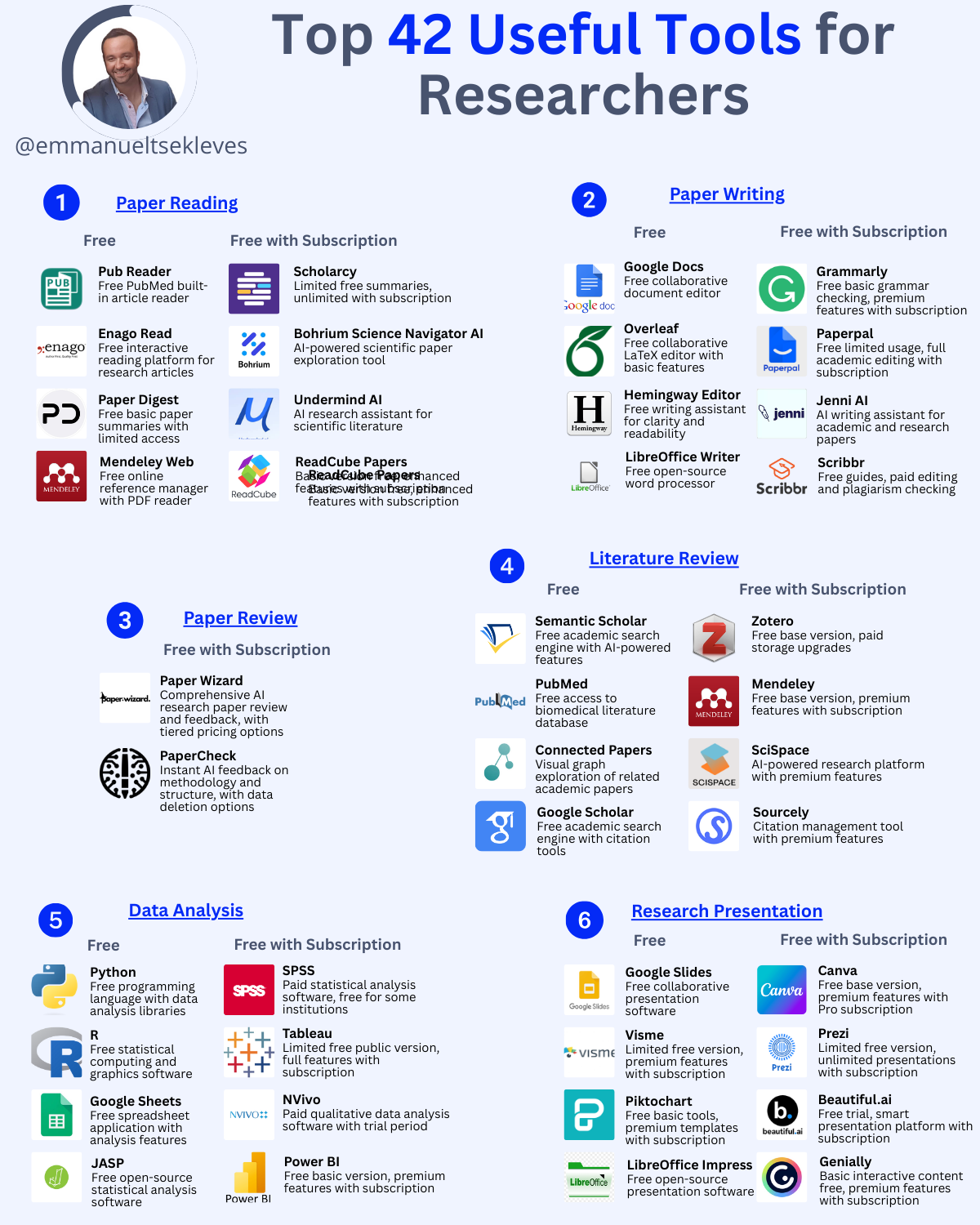
Key Takeaways:
- Adopt one tool per week to avoid overwhelming yourself while building sustainable AI habits
- Start with low-risk tasks like literature search before moving to higher-stakes work like data analysis
- Include verification checkpoints each week to ensure AI is genuinely improving rather than compromising your work
→ Your Action Plan for This Week
- Choose one AI literature search tool to experiment with for Week 1
- Block 20 minutes daily for the next week to practice using your chosen tool
- Create a simple log to track time saved and quality maintained
Which week of the challenge are you most excited or nervous about? Reply and share!
Well, that’s it for today.
See you next week.
Whenever you're ready, there are 3 ways I can help you:
1. Get free actionable tips on how to complete your PhD on time and use AI responsibky in research by following me on X, LinkedIn me Instagram and BlueSky
2. Join my Premium 1:1 PhD Mentorship Program. I provide exclusive, results-driven support for professionals who need fast-track guidance on proposals and thesis completion. Visit my website to learn more about this premium consultancy and book a discovery call.
3. Submit your thesis with confidence through my PhD Thesis Review Service. As an external examiner for 40+ PhDs, I review your work the way examiners do and give you two rounds of detailed feedback. Fill out the discovery form on my website to get started.


Responses