
Today, I'm sharing the exact AI-powered workflow that helped me go from nervous, boring presenter to receiving standing ovations and speaking invitations.
18 February 2026
Read time: 3 minutes
Supporting our sponsors directly helps me continue delivering valuable content for FREE to you each week. Your clicks make a difference! Thank you. Emmanuel
Stop Reading in Circles. Map the Landscape First.
6 weeks of papers. Still no clarity. Sound familiar?
AnswerThis shows how research connects: debates, themes, gaps, from 300M+ sources.
Write your review with citations in the built-in Notebook.
👉 Try free here.
Most academic presentations are painful to watch.
Dense slides packed with text, monotone delivery, and zero audience engagement.
While your colleagues continue giving forgettable talks, you can use AI tools to create presentations that actually captivate audiences and advance your career.
Today, I'm sharing the exact AI-powered workflow that helped me go from nervous, boring presenter to receiving standing ovations and speaking invitations.
These tools will revolutionise how you prepare slides, practice delivery, and connect with your audience.

A few years ago, my conference presentations were disasters.
I'd cram slides with bullet points, read directly from my notes, and watch audience members check their phones within minutes.
After a particularly painful Q&A session where I fumbled basic questions about my own research, I knew something had to change.
I recently started experimenting with AI tools to improve every aspect of my presentation process.
The transformation was remarkable.
My most recent conference talk generated three collaboration requests, two media interviews, and an invitation to give a keynote address.
The difference wasn't better research but better presentation.
Tool Category #1: AI-Powered Visual Design
Creating professional-looking slides no longer requires design expertise or expensive software.
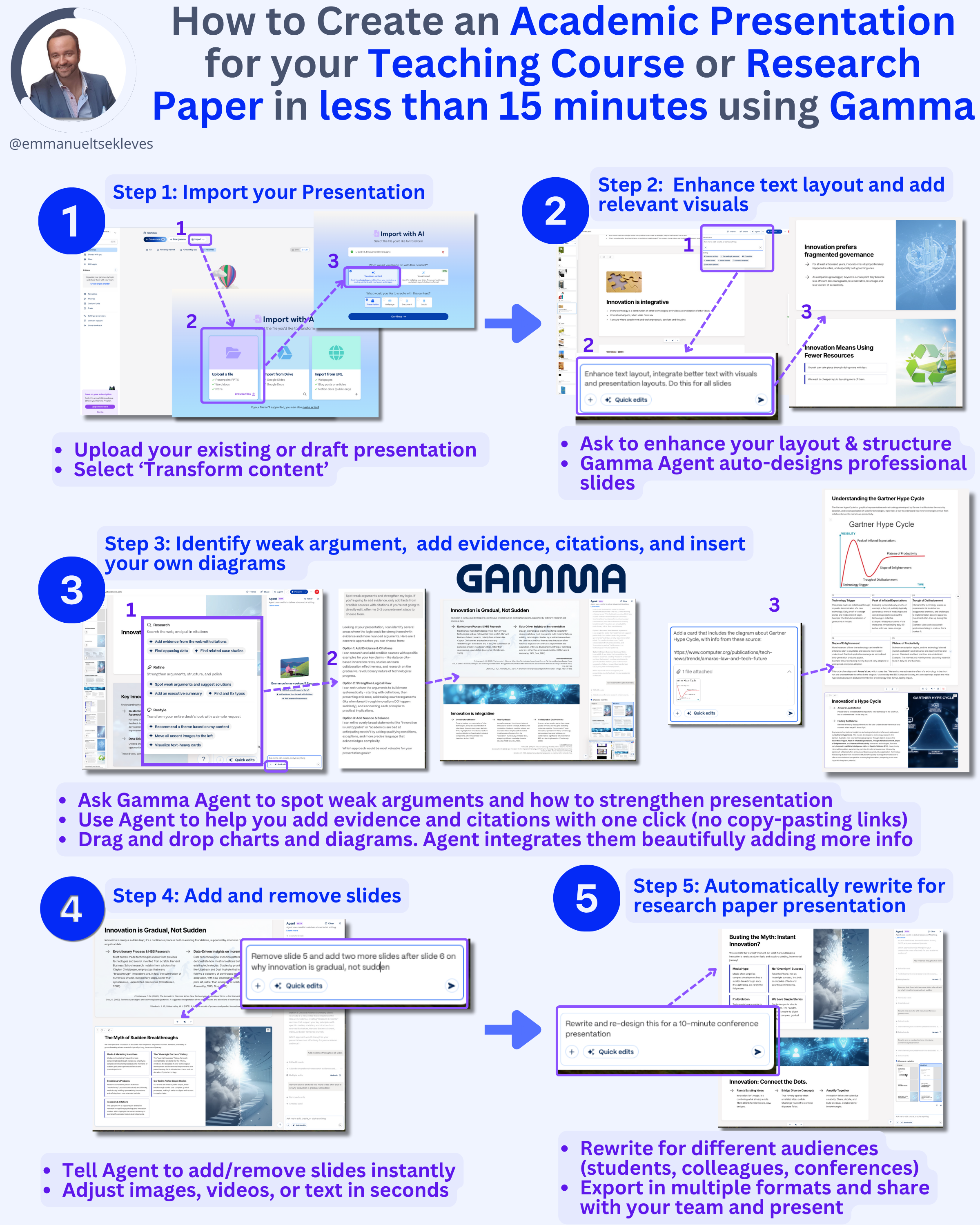
How to use it: Tools like Gamma, Beautiful.AI, and Canva's AI features can transform your basic outline into visually stunning slides automatically.
Input your main points and let AI suggest layouts, color schemes, and visual elements that enhance your message.
Start by feeding your presentation outline to an AI design tool.
Let it create the basic structure, then customize colors and fonts to match your personal style or conference branding.
Tool Category #2: Intelligent Content Optimization
AI can help you structure your content for maximum impact and audience engagement.
How to use it: Use AI tools to analyze your presentation content for clarity, flow, and engagement potential.
Tools can suggest where to add stories, simplify complex concepts, or restructure sections for better logical flow.
Copy your presentation text into an AI tool and ask it to:
- identify confusing sections,
- suggest transitions between topics,
- and recommend places where visual aids would be most effective.
Tool Category #3: Smart Data Visualization
Transform boring tables and charts into compelling visual stories that audiences actually understand.
How to use it: AI-powered tools like Tableau with AI features or DataWrapper can automatically suggest the best ways to visualize your data.
They can identify patterns you might miss and recommend chart types that highlight your key findings.
- Upload your research data and let AI suggest multiple visualization options.
- Choose the ones that make your conclusions obvious at a glance.
Tool Category #4: Speech Preparation and Practice
AI can help you craft compelling narratives and practice delivery until it's natural and confident.
How to use it:
- Use AI tools by feeding your content, to help you create engaging opening hooks, smooth transitions, and memorable conclusions.
- Then use AI-powered speech analysis tools to practice delivery and get feedback on pacing, clarity, and filler words.
- Practice your presentation with AI tools that analyse your speaking patterns and suggest improvements for vocal variety, pacing, and clarity.
Tool Category #5: Interactive Audience Engagement
AI tools can help you create dynamic presentations that keep audiences involved throughout your talk.
How to use it:
- Use AI-powered polling tools like Mentimeter or Slido to create real-time audience interaction.
- AI can suggest relevant questions based on your content and help you interpret audience responses during your presentation.
- Build 2-3 interactive elements into every presentation to maintain audience attention and gather valuable feedback about your research.
Tool Category #6: Personalised Q&A Preparation
AI can help you anticipate difficult questions and prepare confident, clear responses.
How to use it:
- Input your research summary into AI tools and ask them to generate potential questions from different perspectives.
- Practice answering these AI-generated questions until you can respond confidently to unexpected challenges.
- Create a bank of 15-20 potential questions with practiced responses, covering both friendly and hostile scenarios.
Tool Category #7: Post-Presentation Follow-Up
AI can help you create valuable follow-up materials that extend your presentation's impact.
How to use it: Use AI to transform your presentation into blog posts, social media content, or summary documents you can share with interested audience members.
This helps maintain connections and amplify your research impact.
After each presentation, create shareable content that allows interested audience members to engage with your work beyond the conference session.
Implementation Strategy: Start Small and Build
Don't try to use all these tools at once.
Master one category before moving to the next.
How to do it:
- Begin with AI-powered slide design for your next presentation.
- Once that feels natural, add speech preparation tools.
- Gradually incorporate more advanced features like interactive elements and data visualization.
Focus on tools that address your biggest presentation weaknesses first, whether that's visual design, content organization, or delivery confidence.
Key Takeaways:
- Start with AI-powered visual design to create professional slides without design expertise
- Use AI for speech preparation to practice delivery and anticipate difficult questions
- Implement gradually by mastering one tool category before adding others
→ Your Action Plan for This Week
- Choose one AI presentation tool to try for your next conference talk
- Use AI to generate 10 potential questions about your research and practice answering them
- Create one interactive element for your next presentation using AI-powered polling tools
Which aspect of conference presentations do you struggle with most? Reply and share your biggest challenge!
Well, that’s it for today.
See you next week.
Whenever you're ready, there are 3 ways I can help you:
1. Get free actionable tips on how to complete your PhD on time and use AI responsibky in research by following me on X, LinkedIn, Instagram and BlueSky
2. Join my Premium 1:1 PhD/DBA Mentorship Program. I provide exclusive, results-driven support for professionals who need fast-track guidance on proposals and thesis completion. Visit my website to learn more about this premium consultancy and book a discovery call.
3. Submit your thesis with confidence through my PhD/DBA Thesis Review Service. As an external examiner for 40+ PhDs, I review your work the way examiners do and give you two rounds of detailed feedback. Fill out the discovery form on my website to get started.

Responses